Icon of program: Visual Studio Code

Visual Studio Code for Windows

  • Free
  • 4.2
    589
  • 670.7K
  • V1.116.0
Free Download for Windows

View an ad to download for free

Cathy Buggs

Updated last week

Streamline coding workflows efficiently with this app

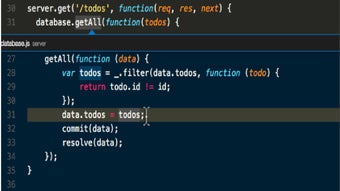
Visual Studio Code is a web development app. It is a versatile and powerful code editor developed by Microsoft, designed to streamline coding tasks across various programming languages. With a focus on efficiency, ease of use, and extensive customization options, VS Code caters equally to beginners and experienced developers.  

Top Recommended Alternative

Visual Studio Code is available for free and compatible across Windows, Linux, and macOS. The entirety of the app offers a robust platform for writing, debugging, and managing code projects. One key strength is its user-friendly interface, providing intuitive navigation and highlighting syntax clearly.  

Leverage intelligent code completion features  

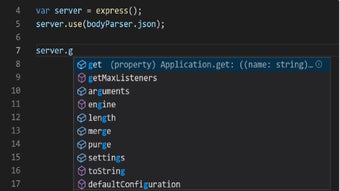
In Visual Studio Code, built-in IntelliSense technology supports automatic code completion, offering intelligent suggestions based on variable types, imported modules, and function definitions, thereby significantly improving coding speed and accuracy. This feature particularly benefits beginners learning new languages or frameworks, reducing errors and accelerating skill development. Extension support is another notable advantage, allowing developers to customize their VS Code environments extensively.  However, it has a steep learning curve especially for beginners. 

A vast library of community-created extensions enables users to adapt the editor to their specific workflow requirements, adding language support, debugging tools, version control integrations, and productivity-enhancing features. Such flexibility ensures that VS Code remains relevant and useful across different project types, from web applications and APIs to data science and scripting tasks. The app’s seamless Git integration simplifies version control tasks. Although settings things-up can be overwhelming

Recent updates expand AI and performance features 

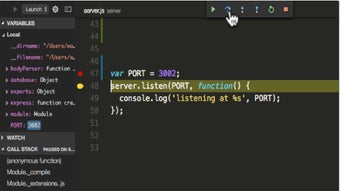
Recent updates to Visual Studio Code have focused on improving performance and expanding AI-assisted development tools. Enhancements to built-in IntelliSense and integration with AI coding assistants allow faster code generation and smarter suggestions. Updates also include improvements to startup speed, reduced memory usage, and better handling of large projects. Refinements to debugging tools and terminal performance make workflows smoother, while updates to extension APIs help developers create more powerful add-ons. 

This app enables developers to perform common operations like staging changes, reviewing file differences, and committing code directly within the editor, eliminating the need for separate tools. Moreover, it offers specialized profile templates tailored for popular workflows such as Python, Java, data science, Node.js, and Angular, streamlining project setups and improving developer productivity from the outset. However, it is not suitable for complex, IDE-level projects without additional setup.

A flexible code editor that grows with the developer 

Visual Studio Code remains one of the best code editors available because it combines accessibility, speed, and deep customization in a package that works for many different workflows. Its IntelliSense, extension ecosystem, Git tools, and ongoing performance improvements make it highly effective for everyday development. However, the initial setup and wide range of options can feel intimidating at first, especially for beginners or users expecting a more complete IDE out of the box. 

Enhance Your Workflow with Visual Studio Code 1.78: Explore New Profile Templates and Themes

Built-in Profile Templates for Popular Programming Languages

The latest Visual Studio Code 1.78 release introduces built-in profile templates for Python, Java, data science, Node.js, and Angular. These curated profiles enable developers to personalize their VS Code experience for specific workflows, streamlining the development process.

Fresh Default Color Themes: Dark Modern and Light Modern

Visual Studio Code 1.78 also brings new default color themes to the table. Dark Modern and Light Modern replace the previous Dark+ and Light+ themes, offering a refreshing visual experience to users.

Improved Diff Algorithm and Deprecated Old Version

The update includes a new diff algorithm that provides better diffs in most cases but may be slower for some documents. While the old algorithm remains the default for now, plans are in place to transition to the new algorithm as the default while monitoring its performance.

Enhanced JavaScript Support in HTML Blocks

With the js/ts.implicitProjectConfig.strictNullChecks setting, developers can enable strict nulls for JavaScript within HTML blocks, improving code safety and reliability.

Introducing the Standalone Color Picker

Users now have the ability to launch a standalone color picker to insert and replace colors in their code effortlessly.

Individual Test Continuous Run Feature

Continuous Run can now be activated for individual tests, providing developers with greater flexibility and control over their testing process.

Drag-and-Drop Functionality for Videos and Images in Markdown Files

Visual Studio Code 1.78 allows developers to drag and drop videos into Markdown files and image files into Markdown cells of notebooks, streamlining the process of creating attachments.

TypeScript 5.1 Support

This release supports TypeScript 5.1, currently in beta, paving the way for developers to explore the latest TypeScript features.

Refined Inline Completion Feature

The inline completion feature has been revamped, fixing bugs and adding an Accept Line command. Accept Word now functions across lines, enhancing the usability of this feature.

Code Actions and Quick Fixes in Source Control Message Box

Developers can now access Code Actions and Quick Fixes directly in the Source Control message box, making it easier to address issues and make changes.

New Snippet Variable: CURRENT_TIMEZONE_OFFSET

The latest snippet variable, CURRENT_TIMEZONE_OFFSET, returns the current timezone offset in either the +HHMM or -HHMM format.

Improved Accessibility for Screen Reader Users

Screen reader users can now exclude hints from a feature's aria-label to reduce redundancy through the "accessibility.verbosity.diff-editor" and "accessibility.verbosity.terminal" settings. Additionally, new audio cues have been implemented for a more user-friendly experience.

VS Code for the Web Supports Git Large File Storage (LFS)

Finally, Visual Studio Code for the Web now supports committing files to Git Large File Storage (LFS) in repositories hosted on GitHub, expanding its capabilities for web-based development.

Cathy Buggs

With decades of experience in IT management and later as a writer and tutor, she combines technical knowledge with a passion for clear communication. His work spans editing, teaching, and writing, bringing authority and precision to content on technology and related fields.

  • Pros

    • Free and cross-platform
    • Strong IntelliSense and smart code suggestions
    • Huge extension library
    • Built-in Git integration
    • Fast, flexible, and widely adaptable
  • Cons

    • Can feel overwhelming for beginners
    • Initial setup may take time
    • Wide range of options can create a learning curve
    • Not a full IDE without added configuration
 0/3

App specs

Also available in other platforms

Program available in other languages


Icon of program: Visual Studio Code

Visual Studio Code for PC

  • Free
  • 4.2
    589
  • 670.7K
  • V1.116.0
Free Download for PC

View an ad to download for free


User reviews about Visual Studio Code

4.2

2 reviews

Add review

Main reviews for you

  • Anonymous user

    Yes! It is cool and nice to use with lots of handy features for professional projects. I love it. It is truly a warehouse of professional coding resources.


  • Anonymous user

    Yes. easy to use and easy to understand for a new user. Though, it can be improved upon. However, so far so good

More

You may also like

Alternatives to Visual Studio Code

Explore Apps

Latest articles

Laws concerning the use of this software vary from country to country. We do not encourage or condone the use of this program if it is in violation of these laws.
Softonic

Is Visual Studio Code safe?

100/100

Score result: Clean

This file passed a comprehensive security scan using VirusTotal technology. It is safe to download.

  • Virus free
  • Spyware free
  • Malware free
  • Verified by Security Partners

    VirusTotal logo

Scan Info

Last scan
Wednesday, April 15, 2026
Scan provider
VirusTotal · Full report

File Integrity

File
VSCodeUserSetup-x64-1.116.0.exe
SHA256
5a8e776bb419ac6c39cb47fb34b4a2f1ff2add78f8784d44c1deb1055afd5f29
SHA1
017edf74fd0b4fc4ed44bc8eba9e60f50656b766

Softonic security commitment

Visual Studio Code has been thoroughly scanned by our advanced security systems and verified by industry-leading partners. This file comes from the official developer and has passed all our security checks, showing no signs of viruses, malware, or spyware. For more information, visit our Security and Trust Center